
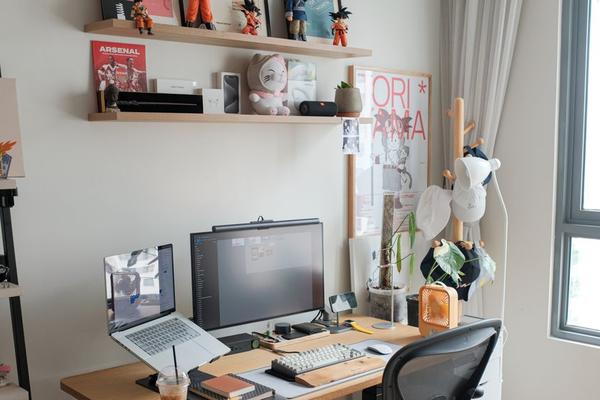
A home office can look polished and still make it hard to concentrate. The most productive spaces are not necessarily the biggest or most expensive; they are the ones that reduce friction between sitting down and getting meaningful work done. With remote and hybrid work now part of everyday life for many people, thoughtful home office design is less about creating a temporary desk corner and more about building a space that supports focus, comfort, and consistent routines.
The best home office design ideas for productivity begin with how you actually work. Someone who spends the day on video calls needs different lighting and acoustics from someone who writes, designs, or handles paperwork. Fit the workspace to your tasks first, then layer style around it.
Start With a Layout That Matches Your Workday
A productive home office starts with a practical home office layout. Before buying furniture, think about the actions you repeat most often. If you switch between a laptop, notebook, and reference documents, you need enough clear desk space to move between them without constant rearranging. If you mainly work digitally, a smaller desk may be enough.
Place frequently used items within easy reach and less-used items farther away. For example, a freelance designer might keep a drawing tablet and notebook on the main desk, chargers in the top drawer, and archived project folders on a nearby shelf rather than crowding the desktop.
Use Natural Light Without Creating Screen Glare
Daylight can make a home office feel more pleasant, but desk position matters. Instead of facing a bright window directly or placing it immediately behind your monitor, try positioning the desk so the window sits to the side. This usually provides natural light without strong screen glare.
In a dim room, combine general lighting with a focused desk lamp. Adjustable lighting is useful during shorter winter days or evening work sessions. Aim for comfortable, even illumination rather than maximum brightness.
Make Comfort Part of the Design
A beautiful chair that becomes uncomfortable after an hour is not a productivity feature. Choose a chair that supports your normal sitting position and allows your feet to rest securely on the floor or a footrest. Arrange the screen so you are not constantly looking sharply downward or twisting your body.
A laptop stand paired with an external keyboard can raise the screen while keeping your hands at a more comfortable working height. Practical adjustments like these often matter more than decorative upgrades.
Reduce Visual Clutter Before Adding Storage
Storage helps only when it reflects what you actually need to keep. Remove outdated paperwork, duplicate stationery, unused cables, and equipment that no longer belongs in your workflow. Then give the remaining items a clear home.
Closed storage suits visually busy supplies, while open shelves can hold a smaller number of useful or attractive objects. A productive home office should not feel empty, but it should make the next task obvious.
Create a Clear Boundary Between Work and Home
One of the strongest work-from-home design strategies is creating a visible boundary around work, even without a separate room. In a living room, a slim bookcase, rug, or change in wall colour can help the office area feel intentional rather than temporary.
The boundary can also be behavioural. At the end of the day, close the laptop, return loose items to their place, and switch off the task light. That short reset creates a stopping point and leaves the workspace ready for tomorrow.
Keep the Background Calm but Not Sterile
Minimal does not have to mean bare. Add a few elements that make the office pleasant to return to: a framed print, a plant suited to the room’s light, a textured rug, or a shelf with books and meaningful objects.
If you spend time on video calls, keep the background simple enough that it does not demand a last-minute tidy before every meeting. Natural internal-linking topics for this section include small home office ideas, desk organisation ideas, and home office lighting.
Design for Fewer Interruptions
Productivity often improves when distractions are slightly harder to reach. Keep your phone off the main desk during focus periods, use a drawer for non-work devices, and position the desk away from a television if possible. In a shared home, headphones, a closed door, or a simple visual signal can communicate that you are working.
Sound matters too. Rugs, curtains, upholstered furniture, and book-filled shelves can soften echo in hard-surfaced rooms, making normal household noise feel less intrusive.
Build Flexibility Into a Hybrid Workspace
A home office used only part of the week may need to serve another purpose. Flexible furniture helps: a desk with drawers can replace a separate filing unit, wall-mounted shelves preserve floor space, and a compact chair can tuck away neatly.
Imagine a small guest room that doubles as an office. Place a narrow desk beside the window, use vertical shelves above it, store supplies in one closed cabinet, and keep the centre of the room open. The room stays functional for weekday work without becoming unusable for guests.
Choose Colours That Support the Mood You Want
There is no single colour that guarantees better focus. Choose a palette that feels comfortable during long work sessions and does not compete for attention. Soft neutrals, muted greens, warm off-whites, and restrained blues can create a calm backdrop, while deeper colours may work well in rooms with good lighting.
If you prefer more energy, use stronger colour as an accent through artwork, a chair, or a painted shelf rather than covering every surface.
Frequently Asked Questions
What is the best home office layout for productivity?
The best layout keeps your main work surface comfortable, gives frequently used items easy access, and reduces glare and distractions. It should reflect your actual tasks rather than copying a showroom setup.
Where should a desk be placed in a home office?
A desk often works well near natural light with the window positioned to one side. Avoid setups that create strong screen glare or force you to face a distracting part of the room all day.
How can I make a small home office more productive?
Use vertical storage, keep only essential items on the desk, choose furniture with built-in storage, and define the work zone clearly. A compact but organised setup can be more effective than a larger cluttered room.
Does home office decor affect productivity?
Decor can influence how comfortable and focused a space feels, but it works best when it supports function. Choose a few personal elements while keeping the main work area visually calm and easy to use.
Create a Workspace That Makes Good Work Easier
The most effective home office is designed around habits, not trends. A supportive chair, sensible lighting, a clear home office layout, useful storage, and fewer distractions can make everyday work feel smoother. Start by fixing the part of your current setup that interrupts you most, then improve the room gradually. When comfort, function, and personality work together, the office becomes a space that helps you begin quickly, stay focused longer, and finish the day with less friction.